
Type fractions like 3/4, mixed numbers like 1 1/2, decimals like 0.5 or whole numbers.
A Fraction Calculator takes the guesswork out of working with numerators, denominators and mixed numbers, whether you’re helping with homework or checking a recipe. Many people get stuck on finding a common denominator or simplifying an answer, and a clear tool can show you the result and the steps behind it.
How to Use a Fraction Calculator
Using a fraction calculator takes just a few quick steps. Enter your numbers, pick an operation, and read the answer. Most tools accept whole numbers, proper fractions and mixed numbers, so you can type what you already have on paper.
- Enter the first number. Type the numerator on top and the denominator below. For a mixed number, enter the whole part first.
- Enter the second number. Fill in the second fraction the same way, making sure the denominator is never zero.
- Choose an operation. Select add, subtract, multiply or divide, depending on your problem.
- Read the result. Check the answer, which is usually shown in simplified form and sometimes as a mixed number or decimal.
Adding and Subtracting Fractions
To add or subtract fractions, the denominators have to match first. A fraction calculator finds the least common denominator for you, rewrites each fraction with that shared bottom number, and then adds or subtracts the numerators. The result comes back in simplest form, so you see the cleanest answer without doing the reduction yourself.
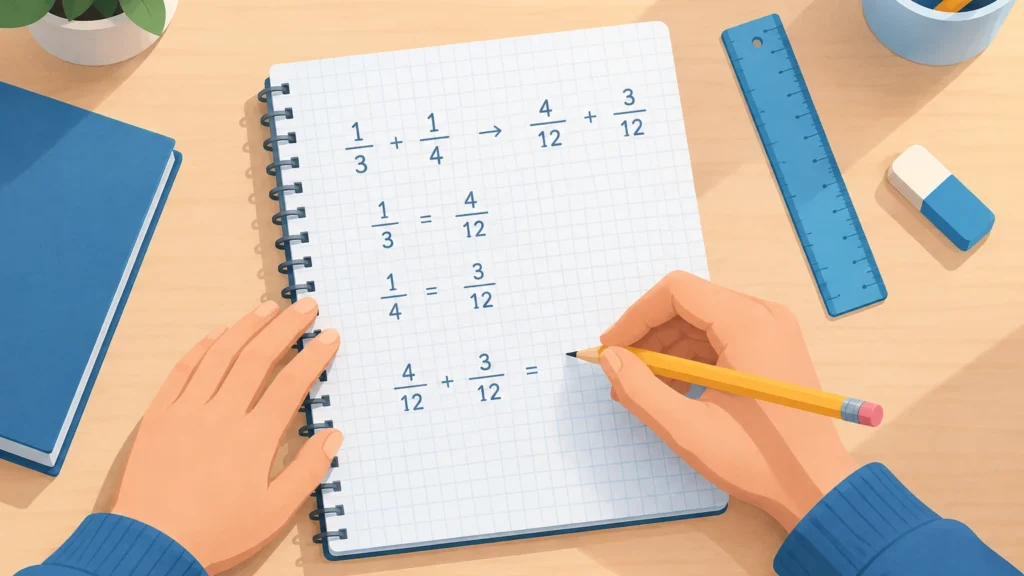
Many tools show the working as well, which helps when you’re checking homework or learning the method. You can see each new numerator, the common denominator, and the final simplified sum or difference. Some versions also handle mixed numbers, converting them to improper fractions before doing the math.
Multiplying and Dividing Fractions
Multiplying fractions is the easier of the two. You multiply the numerators together, then multiply the denominators together, and simplify the result if you can. Dividing takes one extra step: you flip the second fraction (swap its numerator and denominator) and then multiply. So 2/3 ÷ 1/4 becomes 2/3 × 4/1, which equals 8/3. A good calculator handles both steps for you and shows the flipped fraction so you can follow the logic.
Fraction, Decimal and Percent Comparison
Fractions, decimals and percents all describe the same amounts, just in different forms. A fraction shows parts of a whole, a decimal fits easily into money and measurement, and a percent is handy for grades, discounts and rates. Knowing how they match up helps you pick the form that makes a problem easiest to read.
| Fraction | Decimal | Percent |
|---|---|---|
| 1/2 | 0.5 | 50% |
| 1/4 | 0.25 | 25% |
| 3/4 | 0.75 | 75% |
| 1/5 | 0.2 | 20% |
| 1/3 | 0.333… | 33.3% |
Key Takeaways
- A fraction calculator handles adding, subtracting, multiplying and dividing fractions, plus mixed numbers, in one step.
- Always check that the answer is simplified, and convert mixed numbers to improper fractions before you multiply or divide.
- Look for a tool that shows its steps, so you can learn the method instead of just copying the result.
- Fraction, decimal and percent forms are interchangeable, so use whichever form makes your problem easiest to read.
Frequently Asked Questions About Fraction Calculator
What is Fraction Calculator?
A Fraction Calculator is an online tool that performs arithmetic on fractions. You enter two fractions or mixed numbers, choose an operation, and it returns a simplified answer. Many versions also show the steps and convert the result to a decimal or percent.
How does Fraction Calculator work?
You type the numerator and denominator of each fraction, then pick add, subtract, multiply or divide. For addition and subtraction, the tool finds a common denominator. It then combines the numerators, reduces the answer and displays it, often in both fraction and decimal form.
Is Fraction Calculator worth it?
For quick checks, homework verification and everyday measuring, it is usually worth using. It saves time and catches arithmetic slips. Choose one that shows steps if you want to build your own skills, since a result alone teaches less.
What should I know before trying Fraction Calculator?
Make sure you know which number is the numerator (top) and which is the denominator (bottom), and that the denominator is never zero. Check whether the tool gives mixed numbers or improper fractions, and confirm the result against your own estimate before relying on it for schoolwork.
How do you add fractions with different denominators?
To add fractions with different denominators, first find a common denominator, usually the least common multiple of the two denominators. Convert each fraction to an equivalent fraction with that denominator, then add the numerators and keep the common denominator. Simplify the result by dividing the numerator and denominator by their greatest common factor.
References & Further Reading
- National Center for Education Statistics – National Center for Education Statistics
- Khan Academy – Khan Academy
About This Article
This guide was written with AI assistance from publicly available information. Prices, nutrition values and availability can change, so confirm important details with the official source before you decide.
Pingback: Mixed Number Calculator: Free Online Tool
Pingback: Number Base Converter: Free Online Tool